
October 18, 2026 - Scheduling
How to Manage Bookings with Coaching Clients to Avoid Revenue Loss
Losing money to no-shows and cancellations? Here's how to fix your coaching booking system and stop the revenue leak.
.jpg)
How to Manage Bookings with Coaching Clients to Avoid Revenue Loss
A missed session here, a last-minute cancellation there. It doesn't feel like much in the moment, but over time, those gaps will ultimately drain your revenue, retention, and reputation.
For coaches running their practice without a structured booking system, the cost goes beyond the time spent managing appointments manually. The business impact is far greater when a client doesn’t rebook, a follow-up gets missed, or a referral never comes.
This article breaks down the cost of mismanaged bookings, mistakes to avoid, and how the right appointment scheduling software for coaches, combined with a few operational changes, can close the gap.
What Mismanaged Bookings Cost Coaches
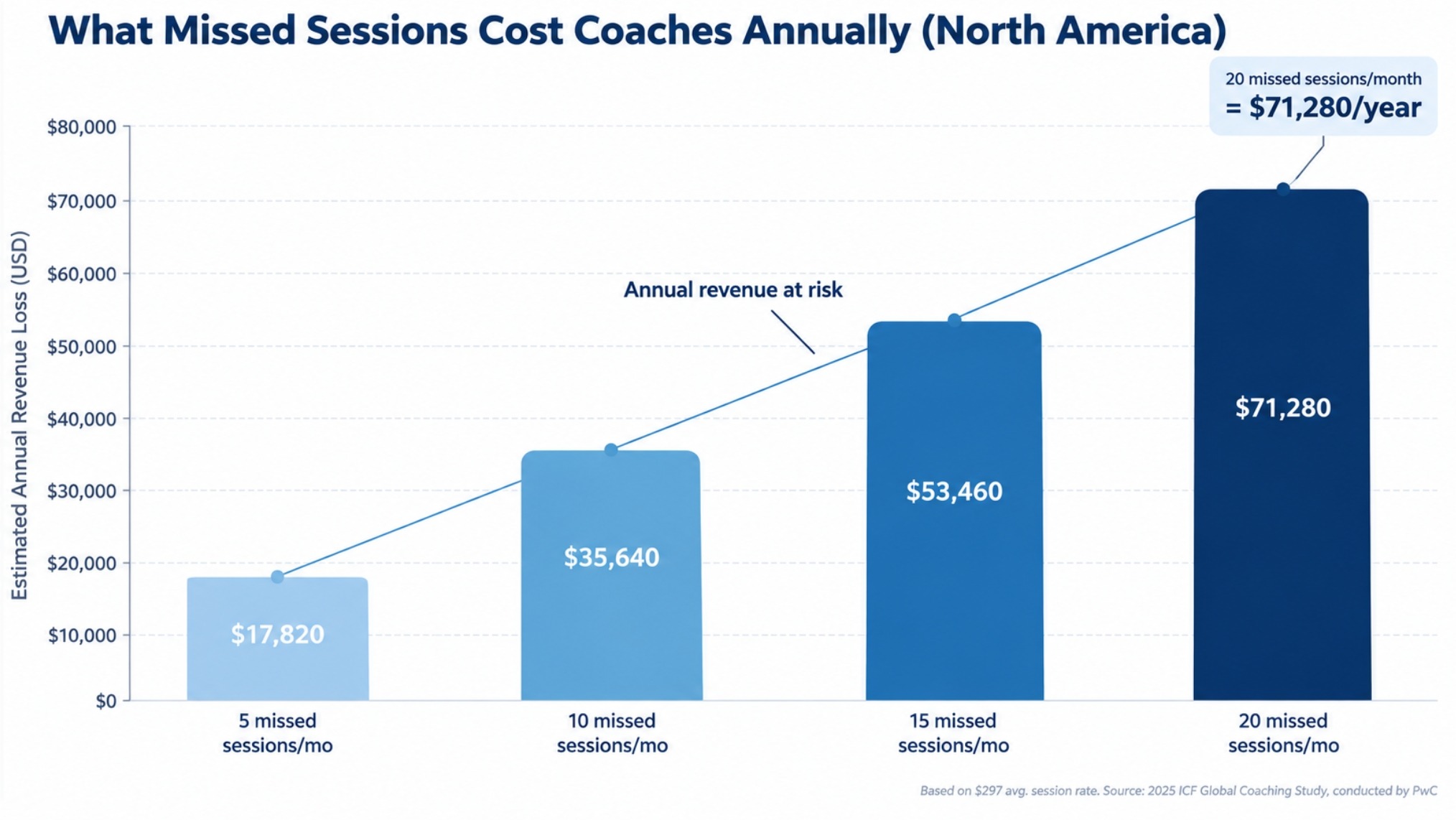
Coaches across niches lose meaningful income every month from preventable gaps between sessions. According to the International Coaching Federation's 2025 Global Coaching Study, the average session rate in North America is $297. At that rate, a coach who has just 5 missed sessions a month loses $17,820 a year. At 10 missed sessions, that's $35,640. At 15, it crosses $53,460. All from a problem that a structured booking system largely solves.
The Hidden Revenue Leak
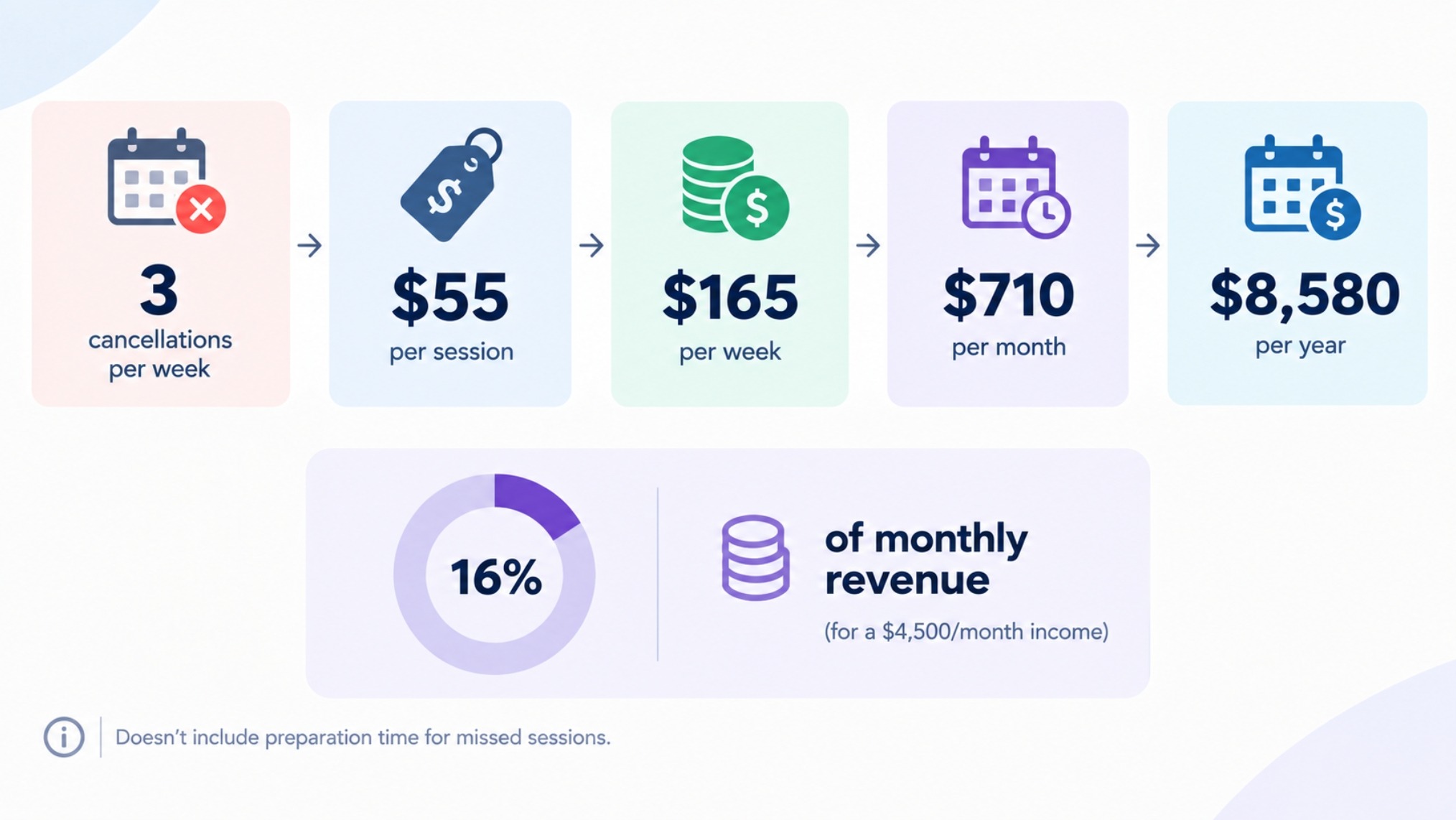
A coach charging $55 per session who has just three last-minute cancellations a week loses roughly $710 a month, more than $8,500 a year, nearly 16% of total monthly revenue for an independent coach earning around $4,500 a month. That figure doesn't account for the preparation time spent on sessions that never happened.
The real problem is that a last-minute cancellation is rarely filled. Unlike a medical practice with a waiting list, an independent coach has almost no chance of filling a 45-minute slot flagged the same morning. The revenue is simply gone.
Damaged Client Retention
Booking friction erodes the relationship that keeps clients coming back. It costs 5 to 7 times more to acquire a new client than to retain one.
This means every client who doesn’t = reschedule a missed session represents a compounding loss, not just a single missed session.
When a booking experience is disorganized, clients notice. Missed confirmations, unclear rescheduling procedures, and forgotten sessions signal a lack of professionalism and is therefore understandable if clients do not bother to renew their coaching agreement..
Lost Referrals
Satisfied clients refer without being asked but a client who found the booking process frustrating won't be making that introduction. The professional experience a client has before and after the session shapes what they say about you afterward, and that starts with how easy it was to get on your calendar.
Wasted Admin Time
A typical manual booking flow involves replying with availability, confirming a time, sending a payment link, following up on unpaid invoices, manually sending a reminder, and starting over if they cancel. Each step takes 5 to 15 minutes. With 20 bookings a month, that's 5 to 10 hours of pure admin time not going into coaching, content, or business development.
Common Booking Mistakes Coaches Make
Back-and-Forth Email Scheduling
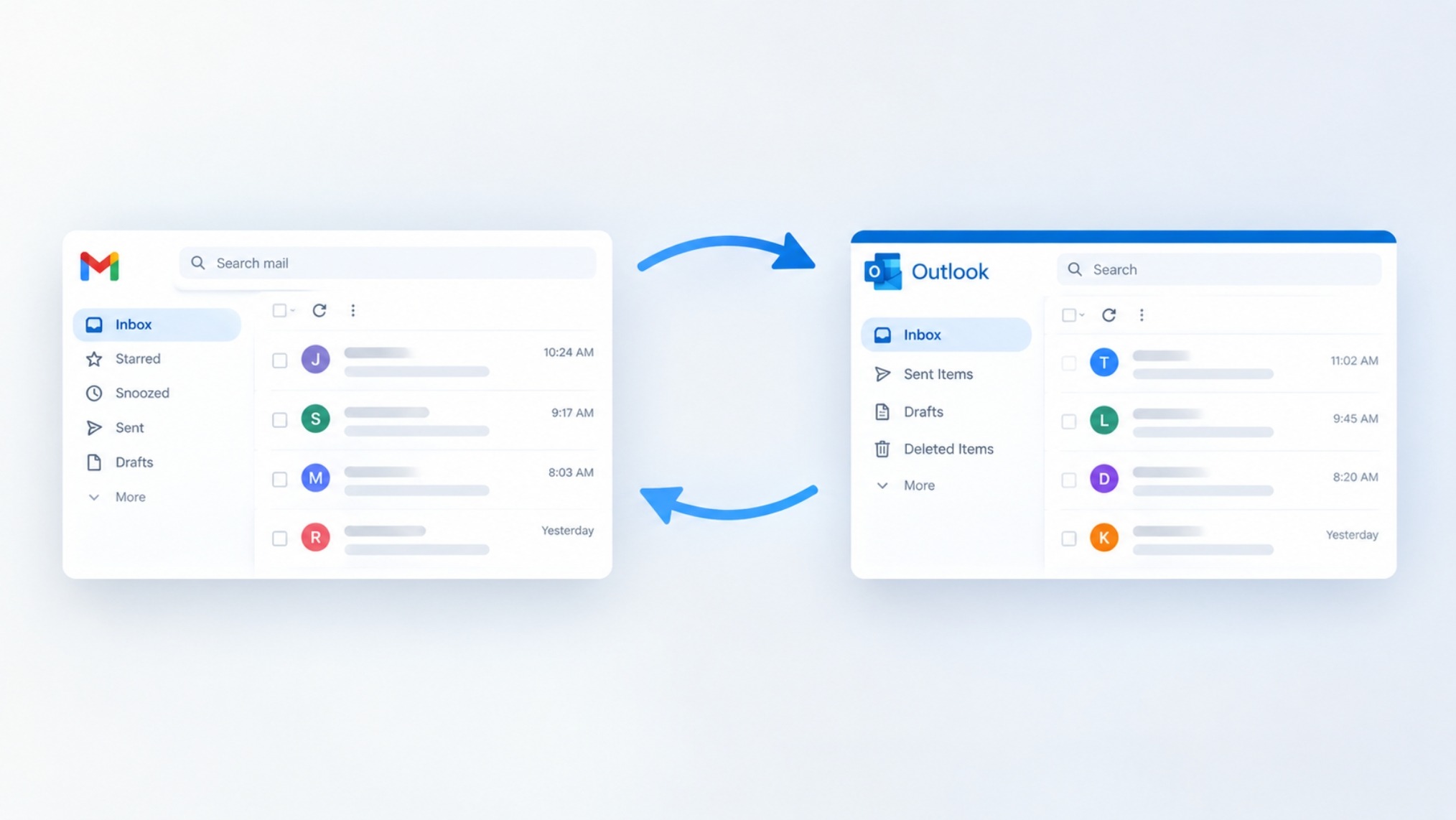
The "what time works for you?" thread is one of the most reliable ways to lose a prospective client before the first call happens.
Every extra step between a prospect showing interest and actually booking a call is another chance for them to lose interest. If it takes three or four emails just to arrange a discovery call, that’s three or four chances for them to go cold.
Email scheduling also produces errors like time zone confusion, double bookings, and sessions without a video link.
None are catastrophic individually, but they compound into an impression that working with you is harder than it should be.
No Cancellation Policy
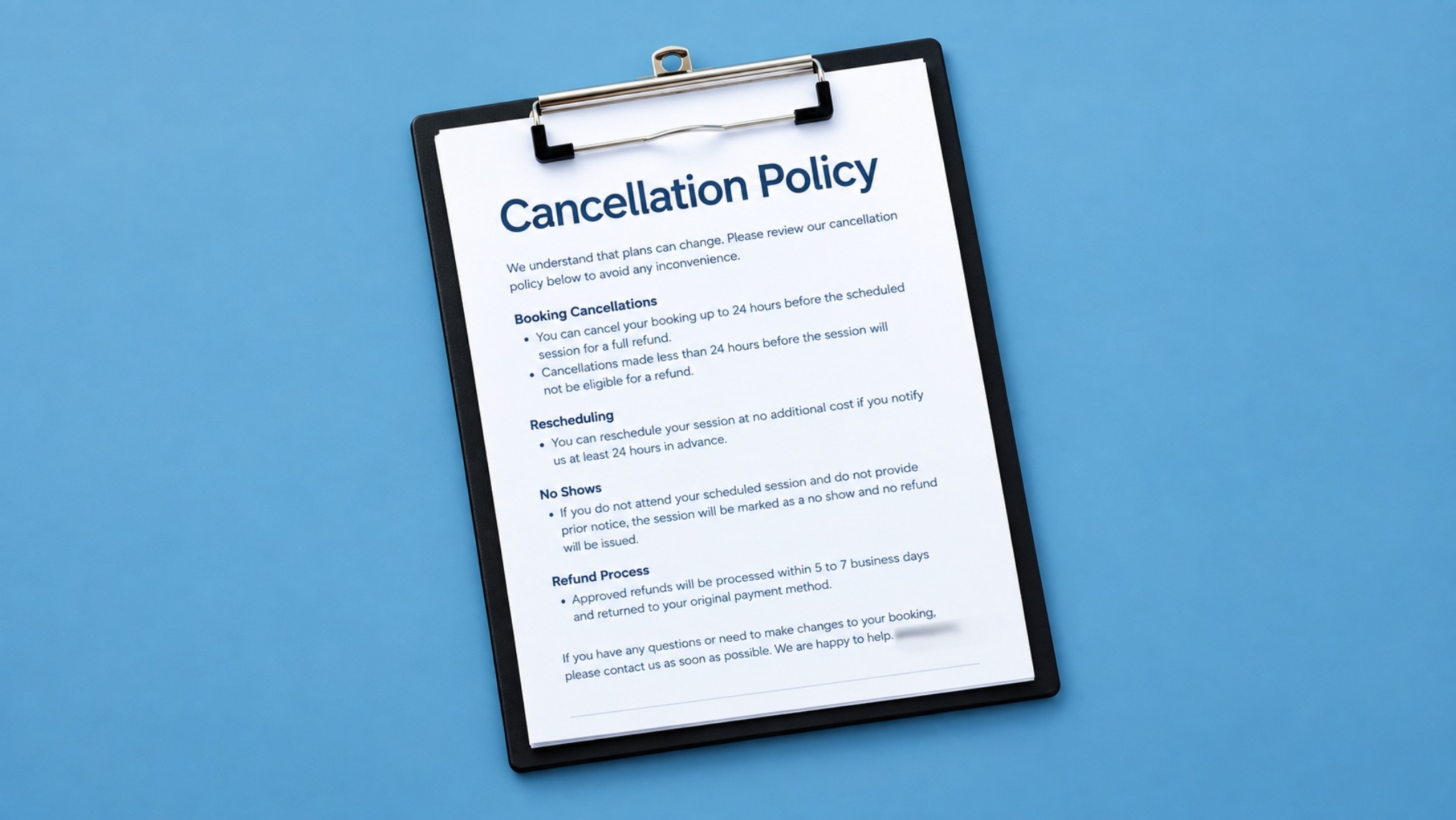
Coaches who avoid setting a cancellation policy often do so out of concern that it will put clients off. The opposite tends to be true.
A clear policy reassures clients. It signals that you take your time seriously and that the engagement has professional structure.
Without one, clients learn quickly that last-minute cancellations carry no consequence. The policy doesn't need to be punitive. It just needs to be written, specific, and communicated before the first session.
Skipping Automated Reminders
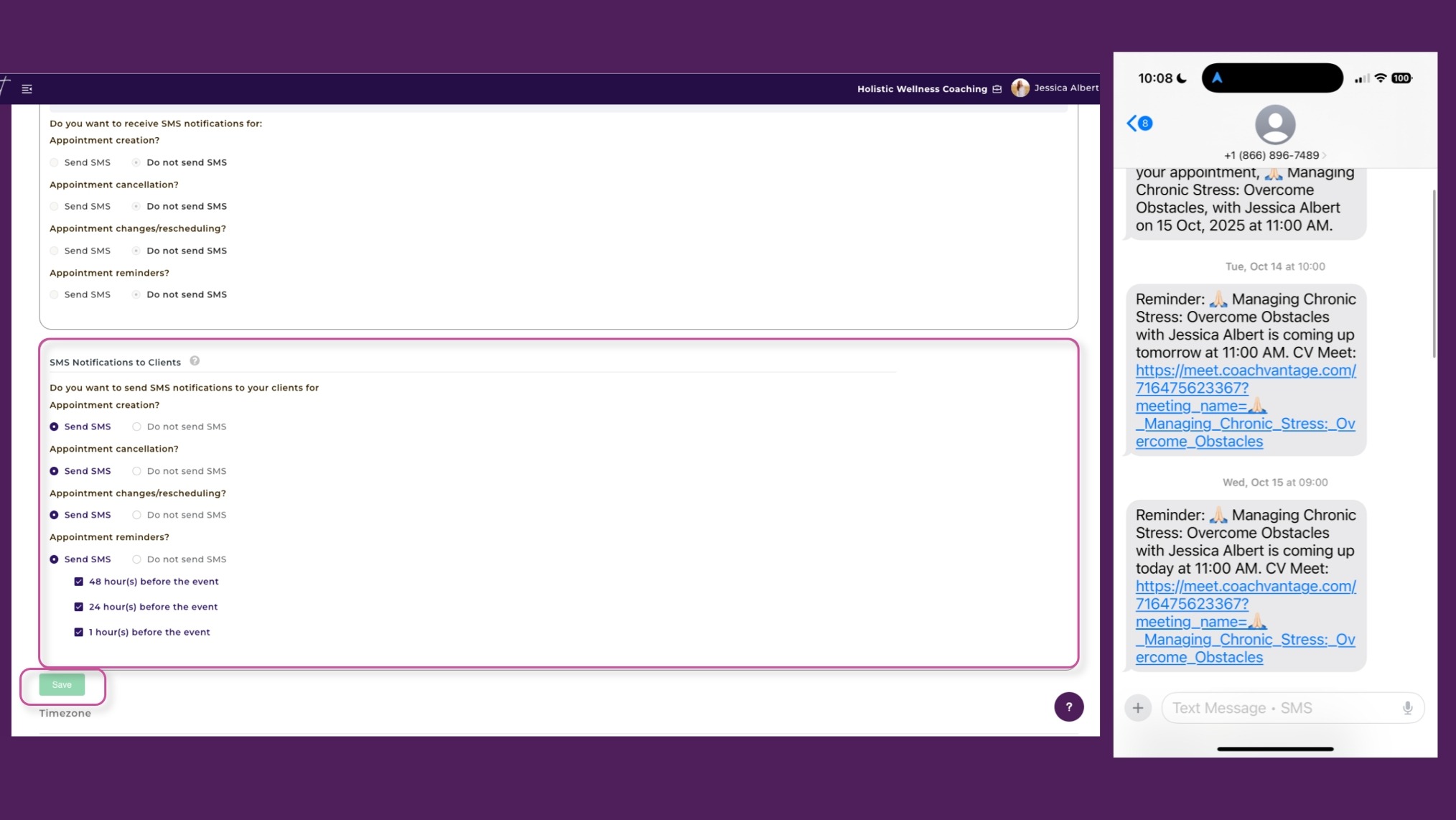
The most common cause of no-shows isn't inconsiderate clients. It's forgetfulness. A message the evening before and a check-in the morning of the session is usually enough to make a real difference.
Coaches who skip reminders out of concern about bothering clients are actually doing them a disservice.
A client who misses a session because they forgot feels different from a client who received a timely reminder and still didn’t show up. In the latter case, you’re having a very different conversation.
Manual Tracking in Spreadsheets
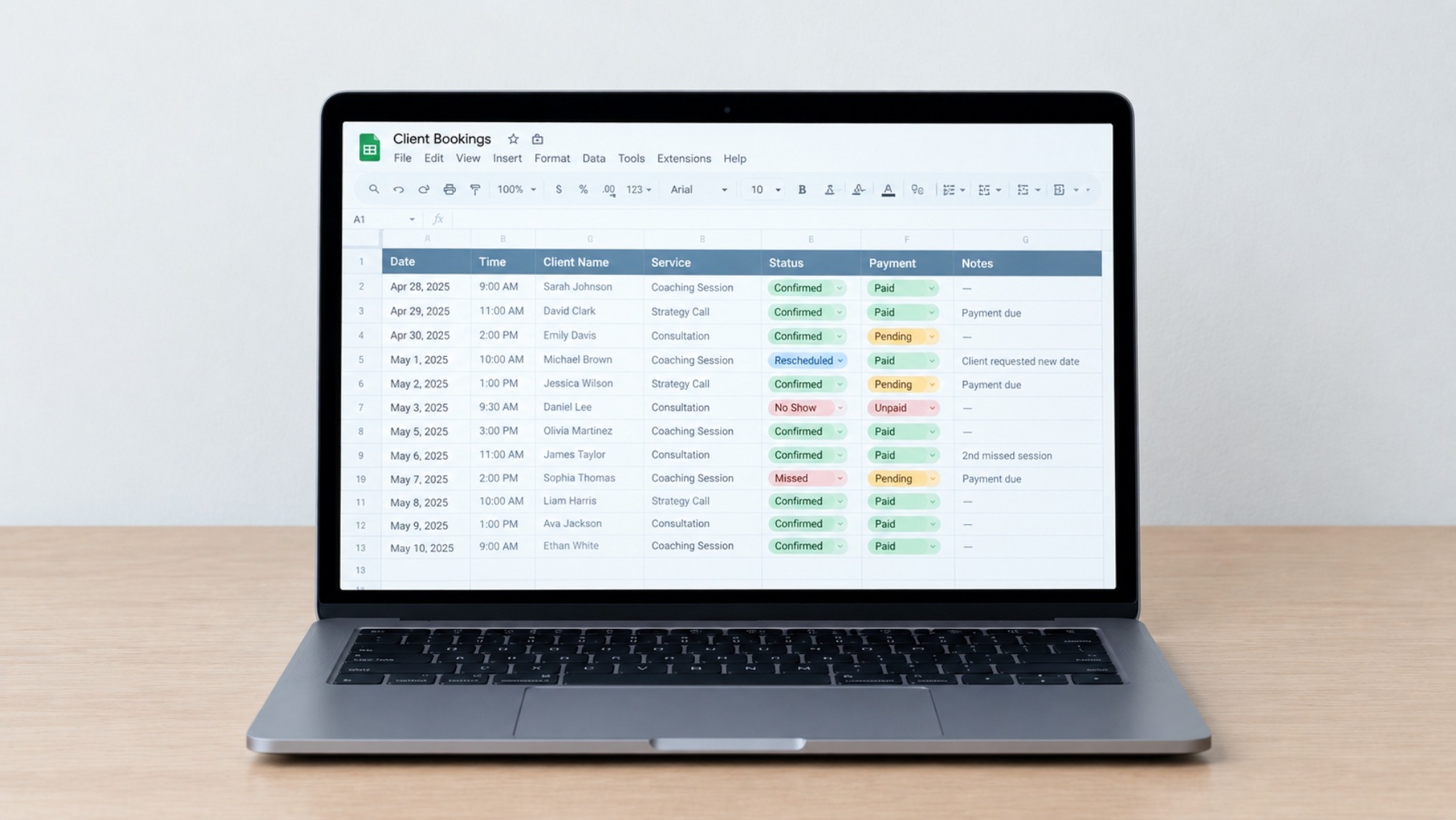
A spreadsheet can record who booked and when, but it can't send a reminder, collect payment, or flag a client who's missed two sessions in a row.
Manual tracking also means there’s no real-time visibility in your schedule. You're piecing together information from your inbox, a document, and memory.
Spreadsheets break in practice: filters get cleared, rows get deleted, and the version open on your screen isn't always current.
Best Practices for Managing and Rescheduling Client Bookings to Avoid Revenue Loss as an Online Coach
Pick a Coaching Platform with Scheduling Features
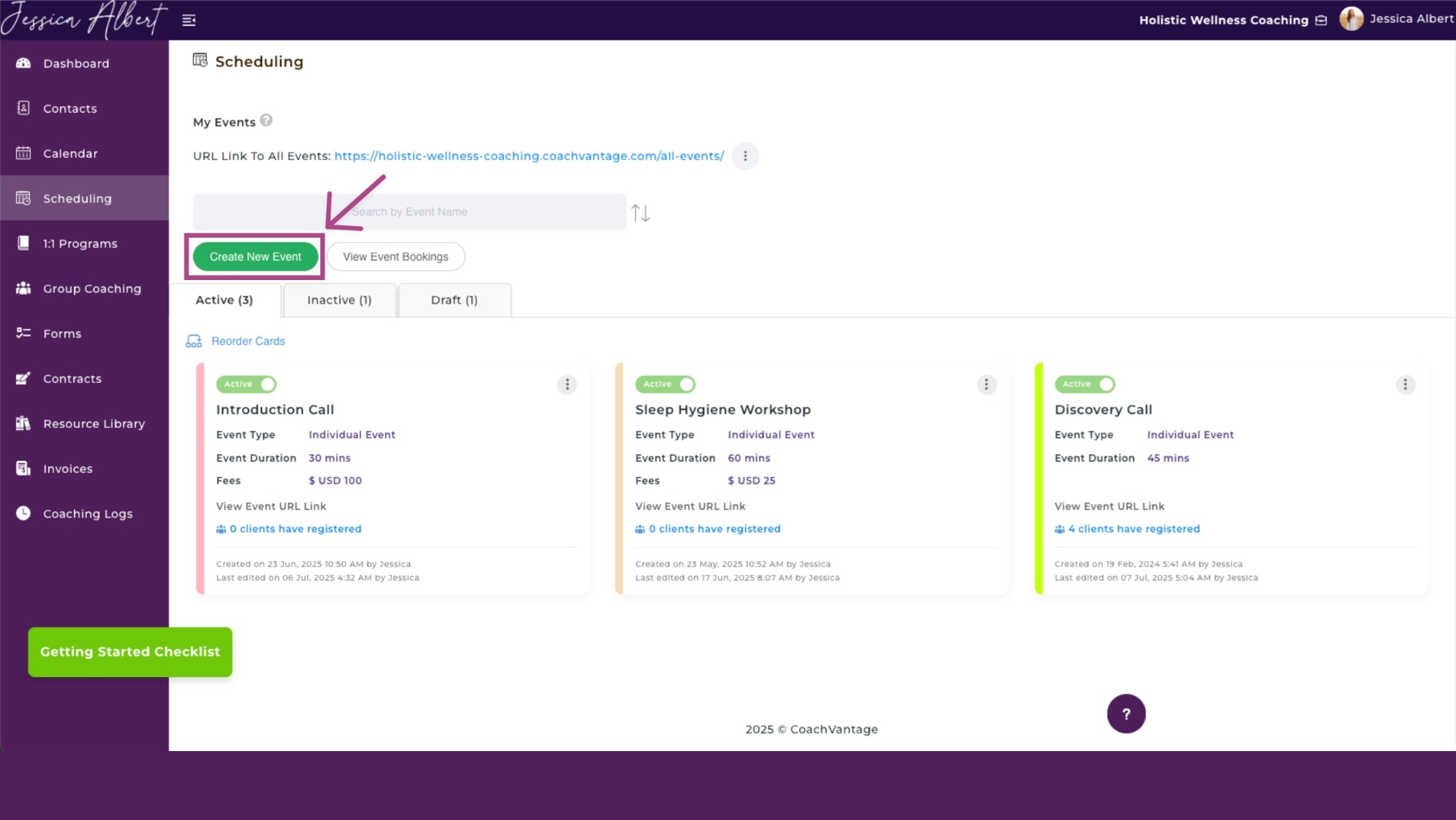
Generic calendar tools weren't built for coaching workflows. The right platform should handle discovery calls, multi-session programs, contracts, and reminders without requiring several separate integrations.
CoachVantage's Scheduling feature works as a standalone booking page for one-off events like discovery calls.
The Programs feature handles longer-term multi-session engagements, each with its own scheduling rules, availability settings, and client portal access.
Having those two workflows separated but connected removes the workarounds coaches build when they adapt general-purpose tools to a coaching context.
Set Availability Boundaries
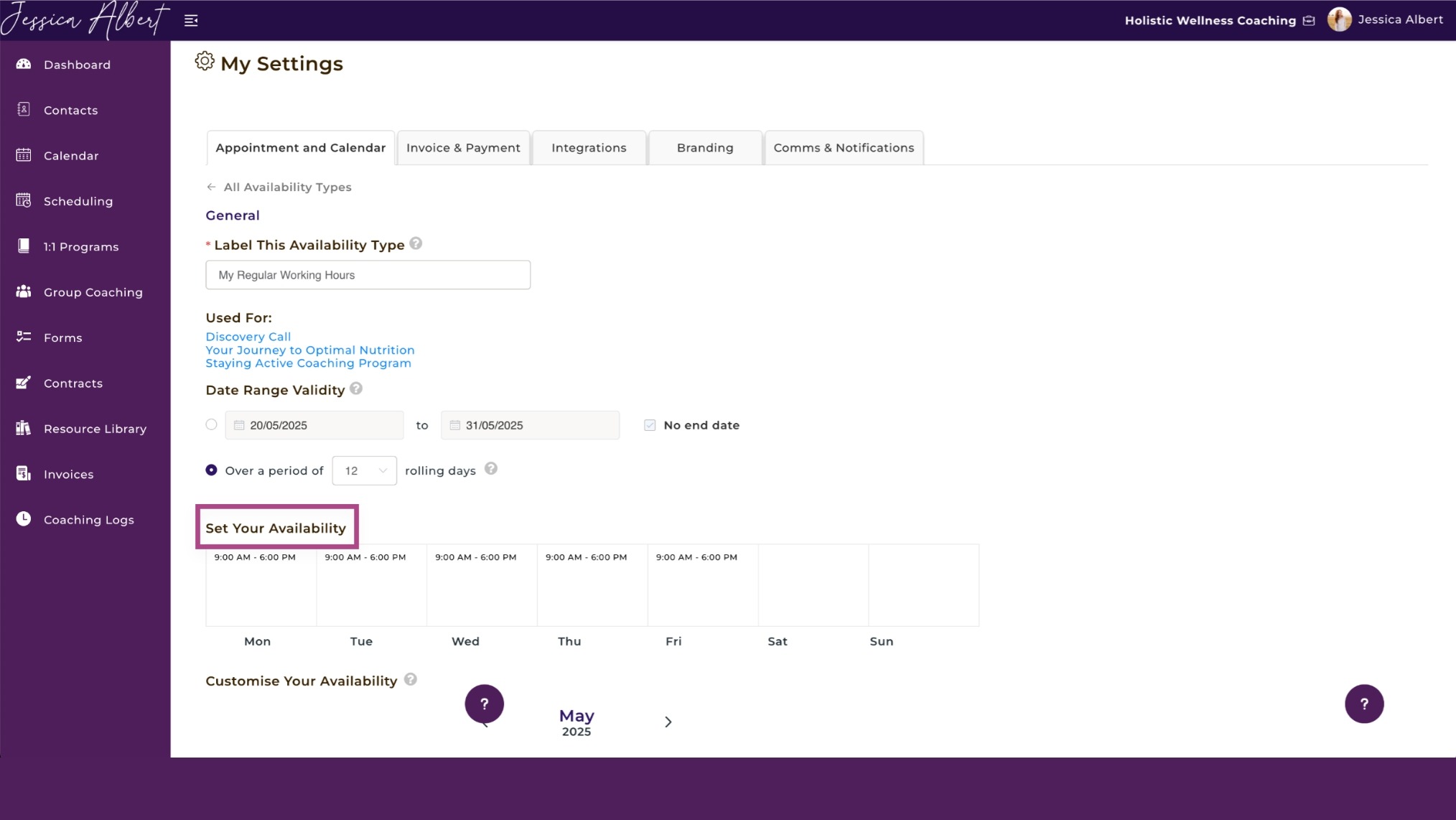
As you continue configuring the software, decide when you actually want to coach. Most coaches set availability to "anytime" to seem accommodating, then end up regretting the 7am slots they didn't expect.
Setting this intentionally, for example, Mondays and Wednesdays 9am to 5pm for one program and Thursdays and Fridays 2pm to 5pm for another, means your calendar reflects how you actually work.
Use Intake Forms at Booking
Manage Your Coaching Practice in One Place
CoachVantage automates your business workflows so you can focus on impactful coaching results.
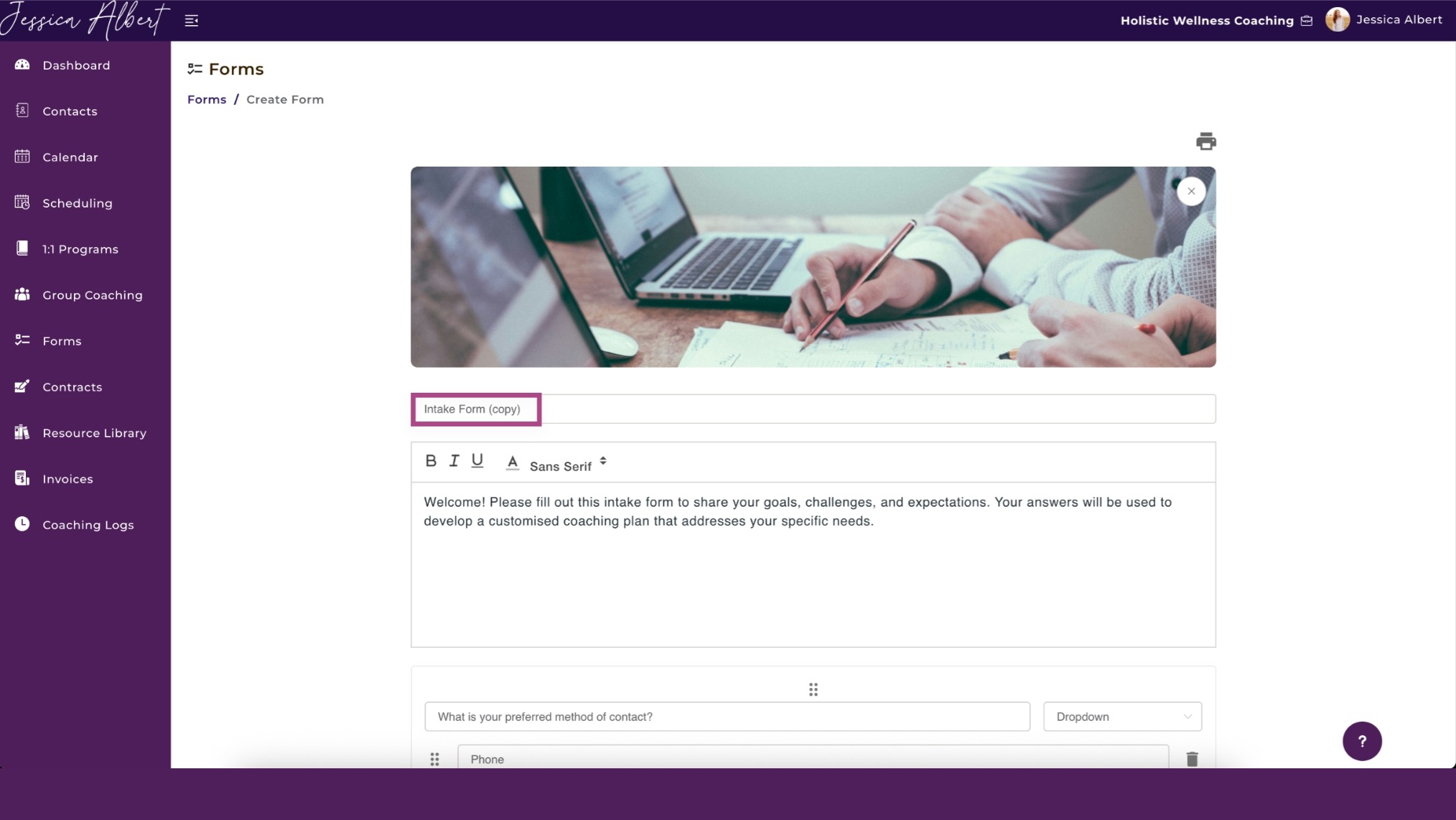
An intake form that’s embedded in the booking page lets clients enter additional information and gives you the context you need to show up prepared. It also raises the client's psychological commitment to the session before it starts.
A client who has answered three focused questions about what they want to accomplish is less likely to forget the appointment or treat it casually. Keep it to three to five questions maximum.
CoachVantage lets you embed a custom intake form directly to each program landing page or booking page, so the client can enter the information as part of a seamless booking flow..
Automate Confirmations and Reminders
Once a client books, they should immediately receive a confirmation with the session time, video link, and any prep instructions.
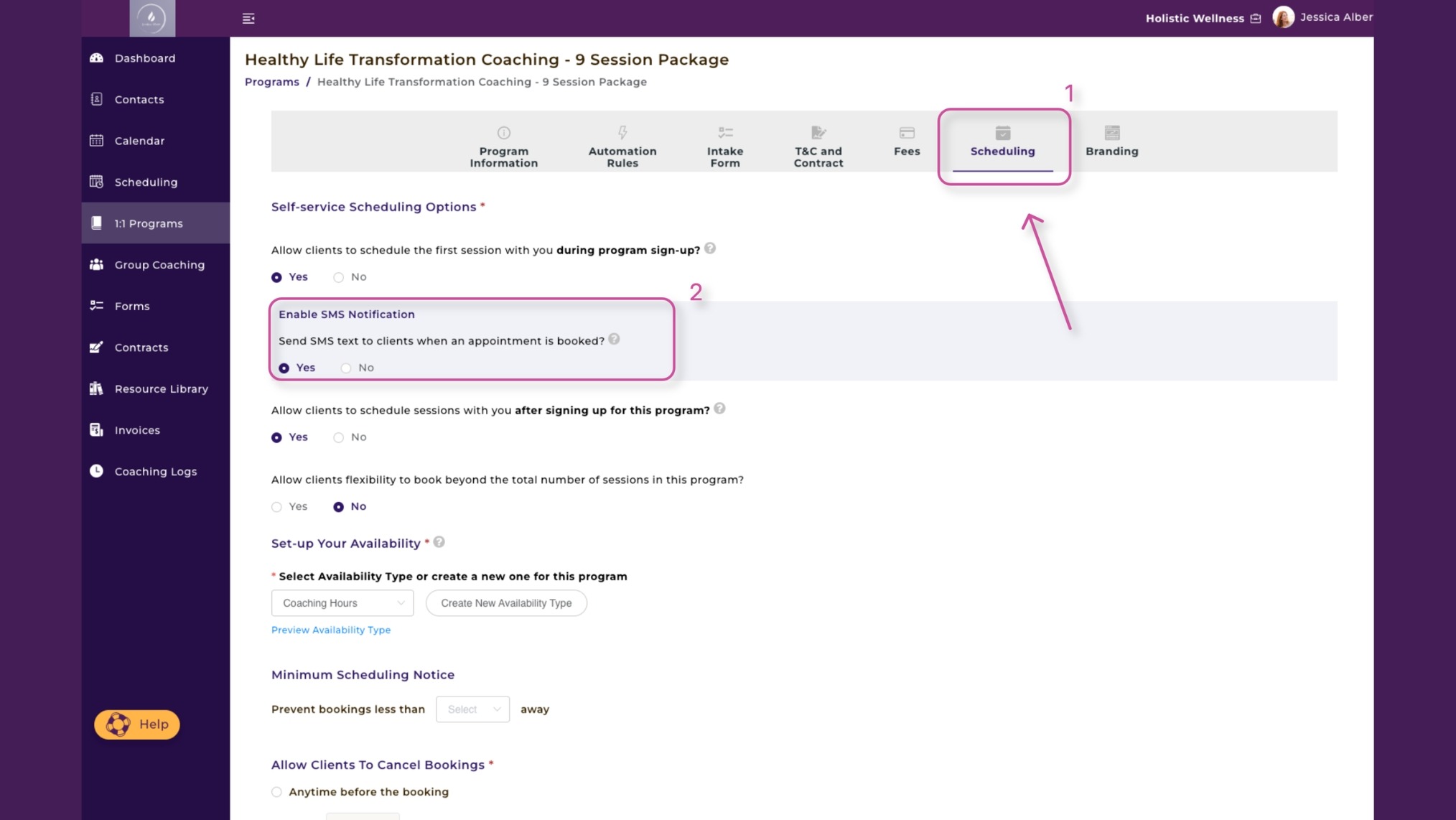
A solid reminder sequence includes a 24-hour email with session details, a 1-hour reminder with just the link and time, and optionally an SMS message a few minutes before.
CoachVantage supports automated SMS notifications for events and programs. So clients receive reminders through a channel they're likely to check alongside their booking confirmation email.
Connect Bookings to Payments
Collecting payment during the booking process eliminates invoice chasing and reduces no-shows. Clients who have paid are far more likely to show up.
For new clients especially, that financial commitment changes their mindset about the session before it starts. Having paid for a session means that they don’t take it frivolously.
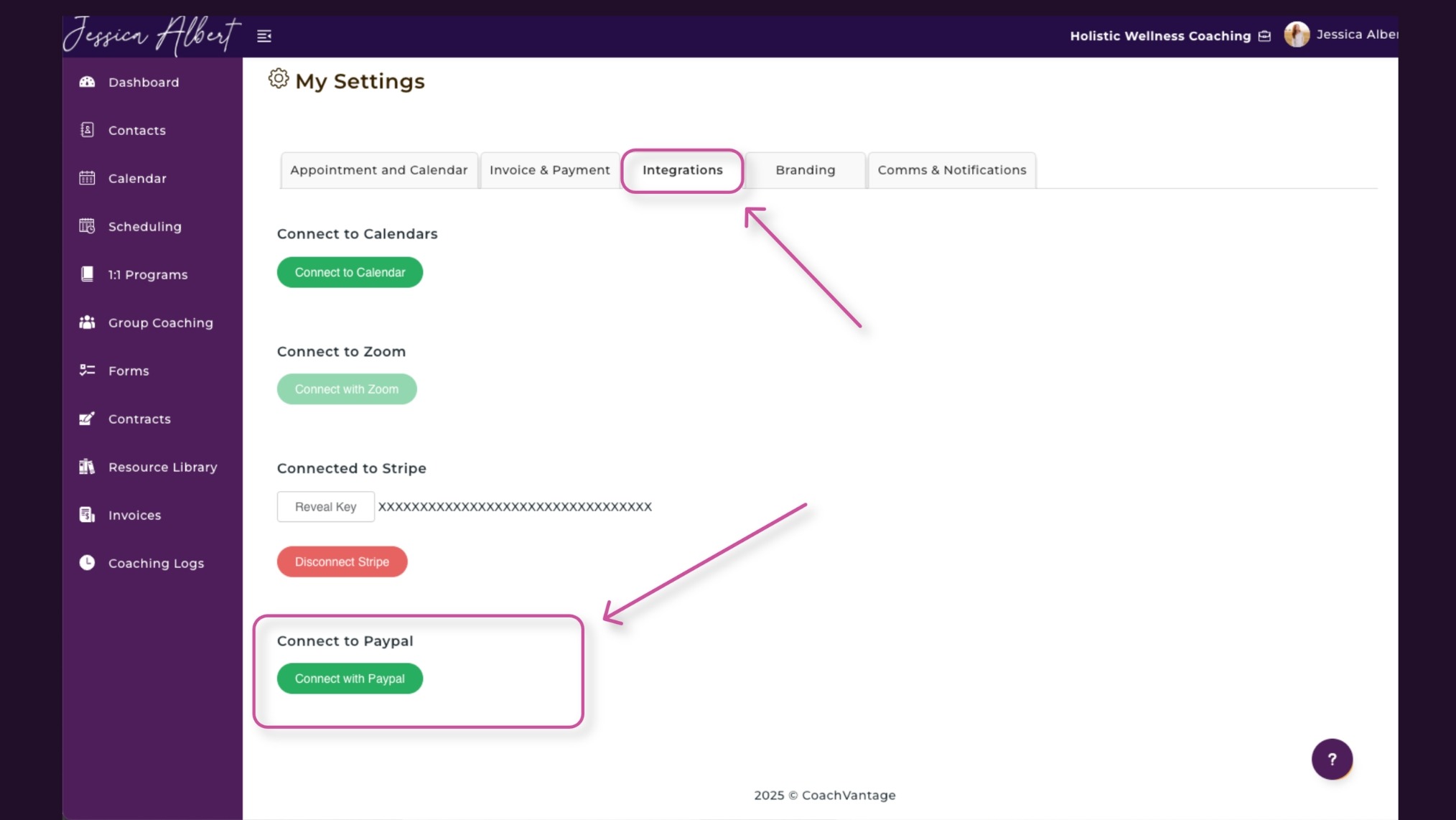
CoachVantage integrates with Stripe and PayPal to allow online payment during enrollment into a coaching program or at the point of booking a discovery call.
For recurring clients on a package, automatic card deductions remove the need to chase payment entirely.
Structure Engagements as Programs
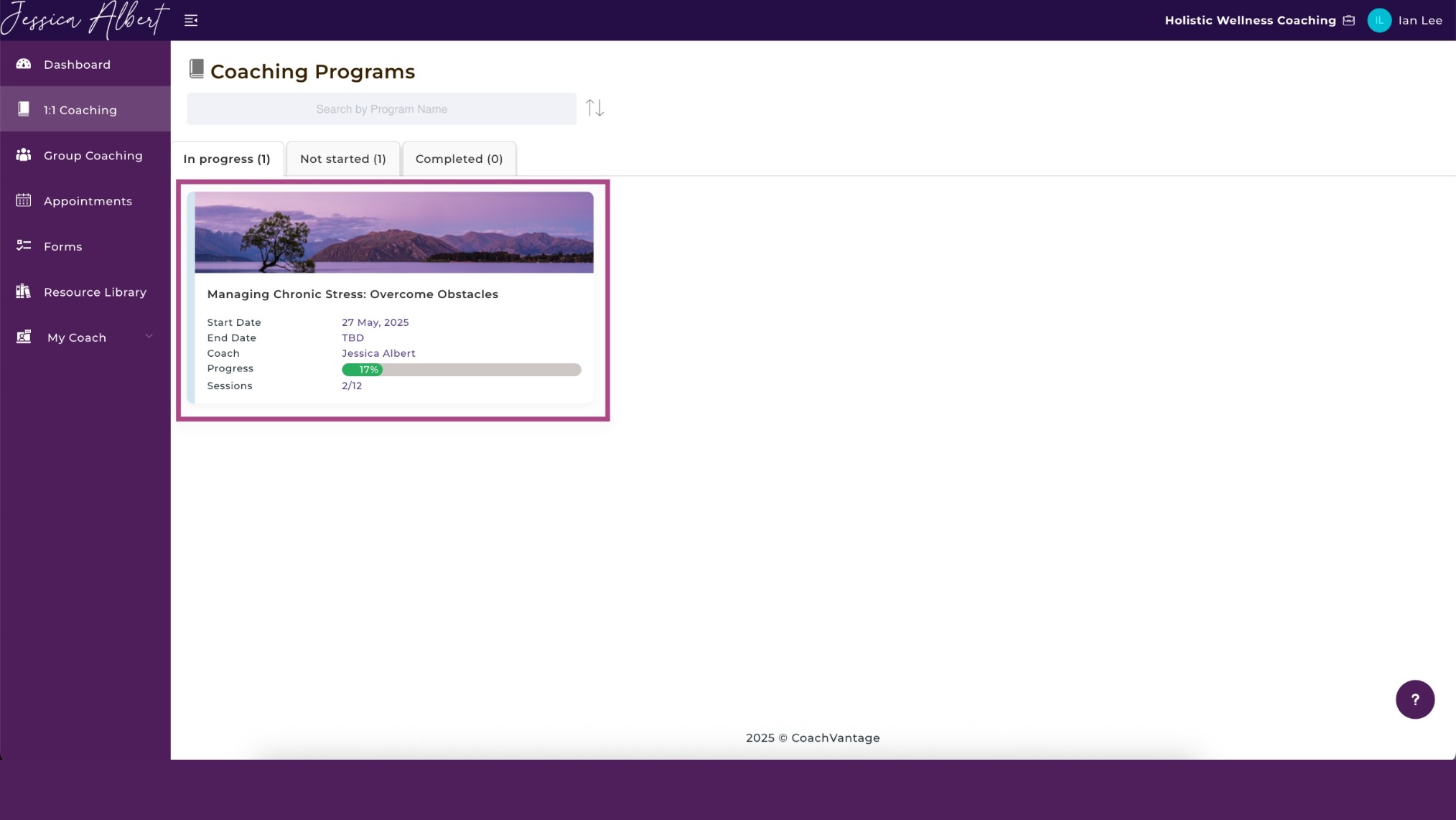
Single-session clients are harder to retain over time, but a client who’s enrolled in a structured program has already committed financially and psychologically to the process. Plus, coaching takes time to create meaningful change.
Clients can see their program progress, session count, and upcoming appointments directly from their portal, so they're not starting the booking process from scratch each time.
Prepaid sessions that go unused also encourage attendance in a way that pay-per-session arrangements don't.
Put a Cancellation Policy in Place
A cancellation policy should cover four things:
-
The cancellation window (24 hours before the session is standard)
-
The consequence of cancelling, if applicable
-
The preferred channel for notifying you
-
An exception clause for genuine emergencies.
That last part matters. It makes the policy feel human rather than mechanical, and clients respond better to a framework they believe is reasonable.
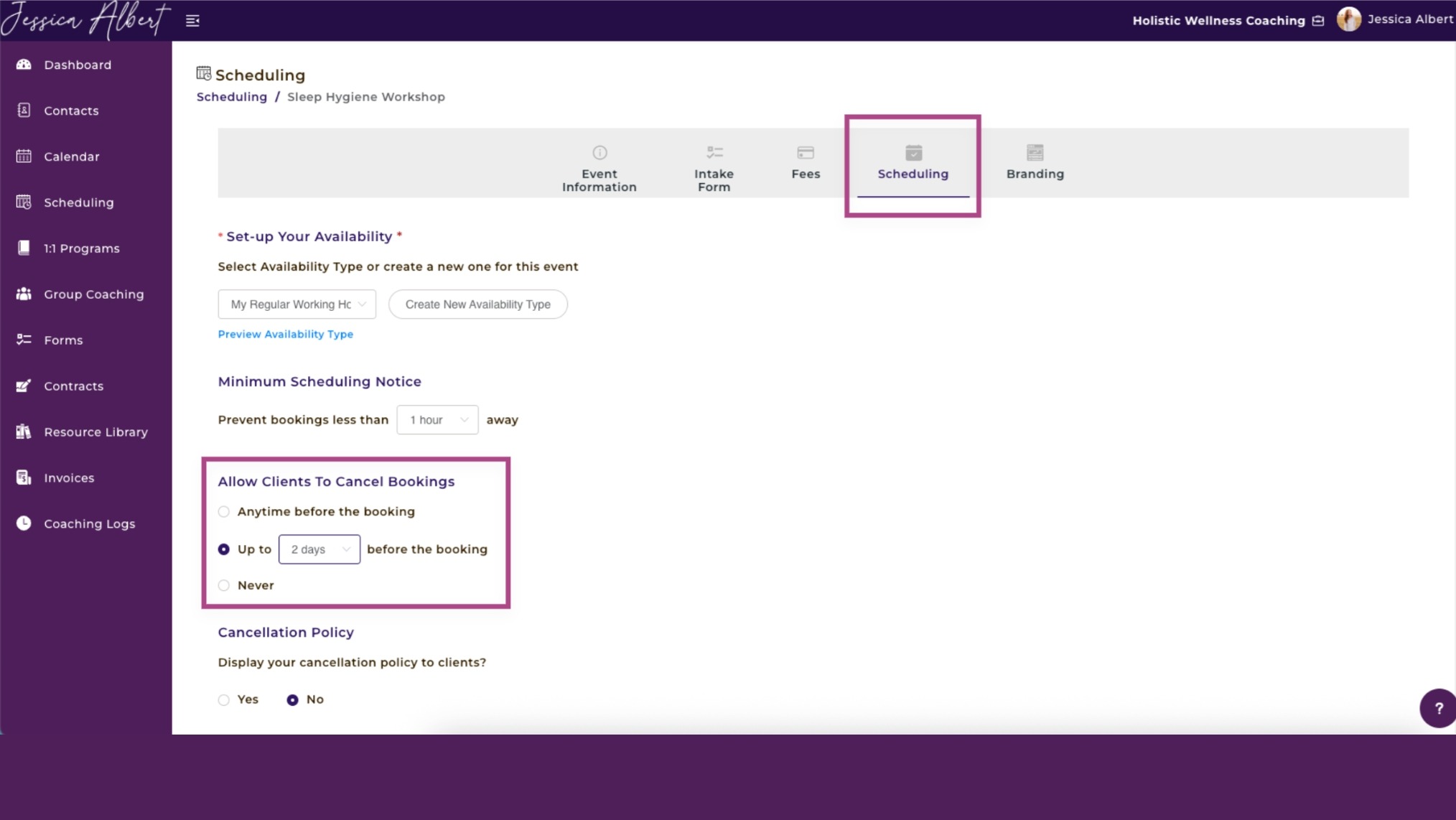
Coaching platforms like CoachVantage let you control cancellation and rescheduling settings for each individual booking type you create.
You can allow clients to cancel anytime before a booking, restrict cancellations to a set window, or disable self-service cancellation altogether. Also, you can require clients to provide a reason when rescheduling.
Set a Rescheduling Limit
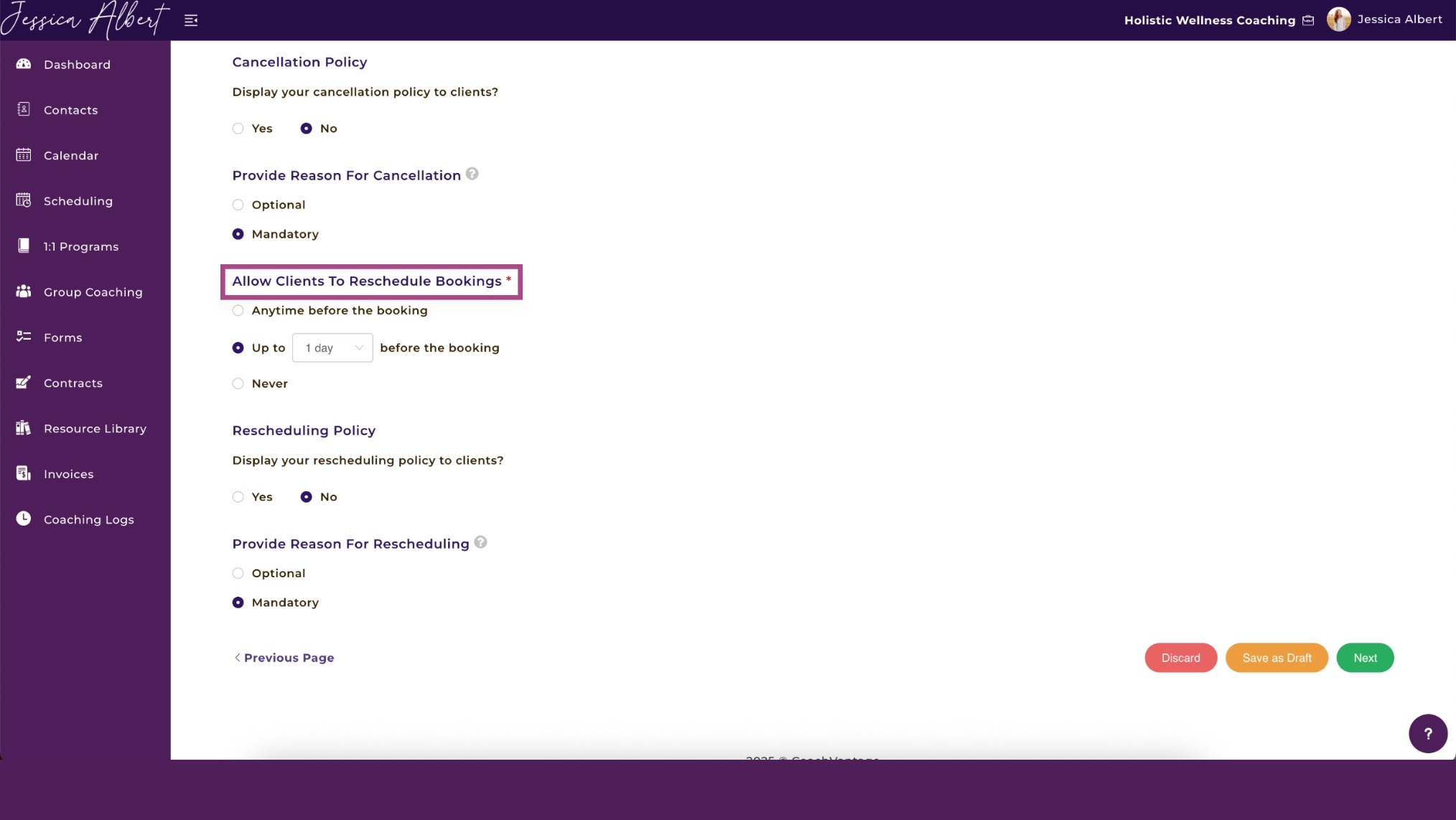
A cancellation policy without a rescheduling limit is only half a policy. Some clients won't cancel outright but maywill reschedule repeatedly without consideration of the impact and inconvenience it causes you . The effect on your calendar is that a held slot keeps moving until the session quietly disappears.
Cap reschedules at once per package or once per rolling 30 days, and write it into your coaching agreement before the first session.
Frame it the same way you frame cancellation exceptions: a standard rule with a human clause for genuine circumstances.
Have a No-Show Protocol
A no-show without a response sets a precedent. The client learns that missing a session carries no consequence, and that behavior is hard to break if the client thinks you’re ok with it.
You can send a brief, non-accusatory message within the hour and recover a significant number of sessions that would otherwise be lost. If there's no response within 24 hours, apply your cancellation policy and log it in the client's record.
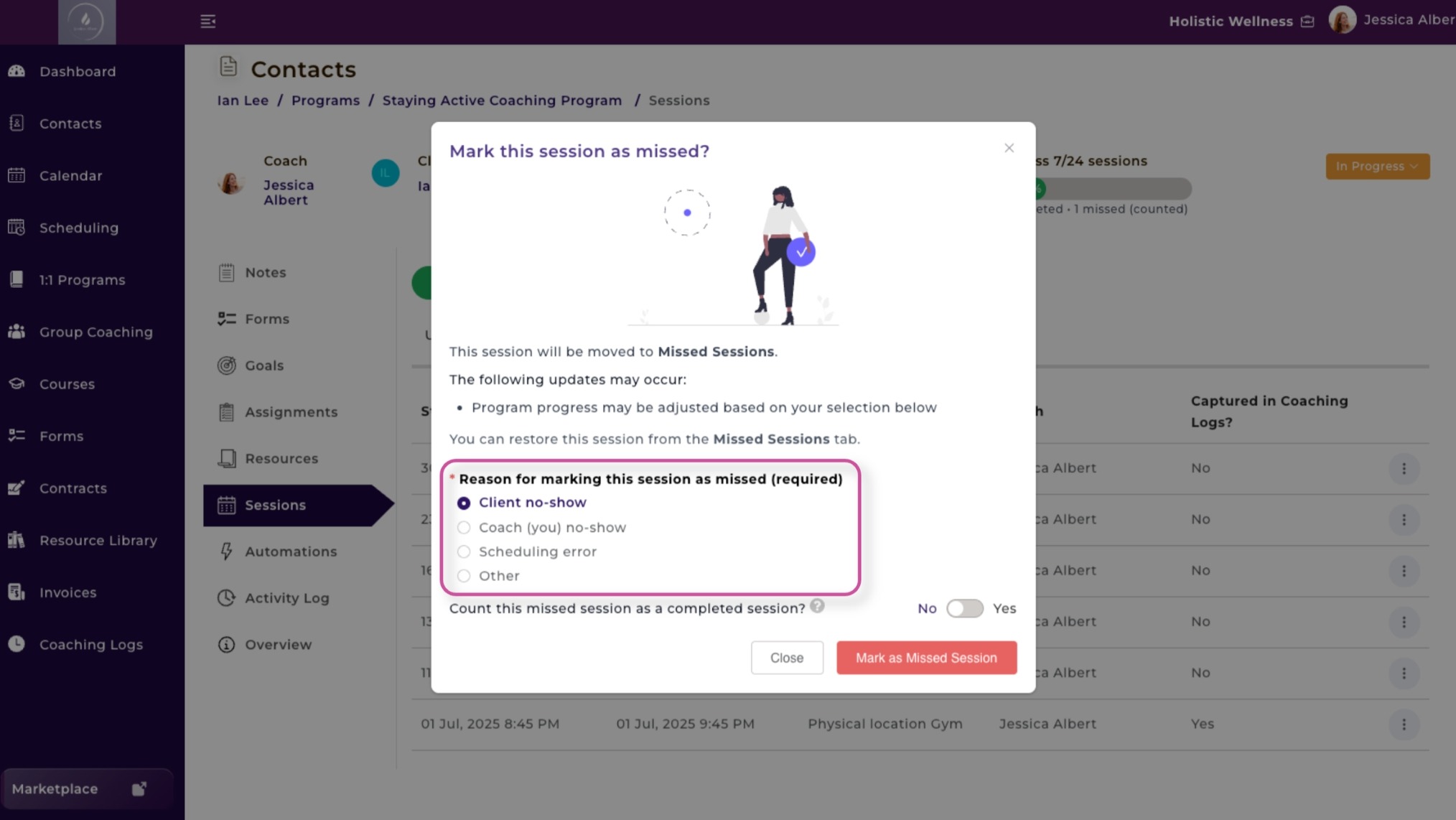
In CoachVantage, you can mark the session as missed, select the reason, and decide whether it counts against their session total.
Your Booking System Is Your Business
Every no-show, back-and-forth email, and unpaid invoice you chase after a session shows that your coaching practice hasn't been set up to protect its own revenue. Most of it is preventable with the right system in place.
CoachVantage was built for coaches across every niche, with scheduling, programs, contracts, invoicing, and client management all in one place.
Start your 14-day FREE trial today and stop losing revenue to problems that have already been solved.
Frequently Asked Questions
What is the procedure for rescheduling an online coaching session?
Notify your coach at least 24 hours before the session through the agreed channel, whether that's email or a client portal. In CoachVantage, clients can reschedule directly from their booking confirmation without contacting the coach manually.
How do coaching appointment reminders reduce no-shows?
Automated reminders sent at 24 hours and 1 hour before a session keep the appointment top of mind and give clients enough notice to show up or reschedule. Including the video link in each reminder removes any last-minute friction that might cause them to miss it.
How do I implement coaching booking software into my existing workflow?
Connect it to your existing calendar first to prevent double bookings, then configure your availability, session types, and payment settings. CoachVantage is designed to slot into your current process without making you rebuild everything from scratch.
What is a virtual event platform for coaches, and do I need one?
It's a tool that handles scheduling, video hosting, and payments in one place rather than across separate apps. If most of your coaching happens online, a dedicated platform removes the friction of using multiple tools and gives clients a more professional booking experience.
Want More Coaching Clients?

Get Your Free Guide to Create An Irresistible Lead Magnet
And attract clients who want to work with you.
Get Your Free Guide Now
Glen Oliveiro
Founder of CoachVantage
With a pulse on the coaching industry, Glen has personally engaged with hundreds of coaches to develop a platform that addresses their day-to-day challenges. A visionary entrepreneur, Glen is committed to revolutionizing coaching practices through the innovative solutions offered by CoachVantage.




.jpg)
.jpg)